Remove Background from GIF
Upload an animated GIF and our AI cuts the subject out of every frame — then download it as a transparent GIF or an animated WebP. Free, no signup, no watermark.
Free every day within a per-GIF frame allowance; a free account raises the daily allowance, and paid plans raise the frame ceiling for longer animations. Exact numbers are in the limits section below.
See it on a real GIF
Left: the original animated GIF. Right: the same GIF after our tool cut the subject out of all 30 frames — shown on a checkerboard, with the original timing and infinite loop intact.
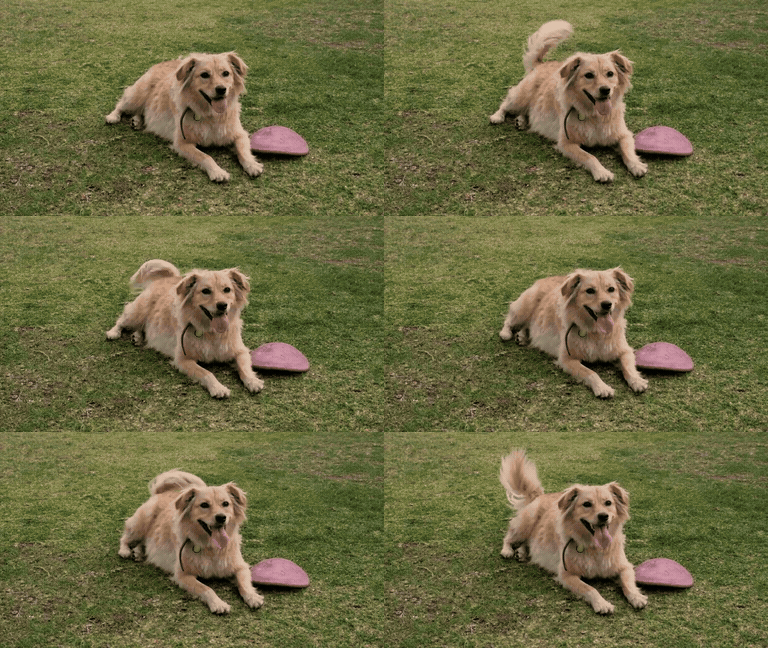
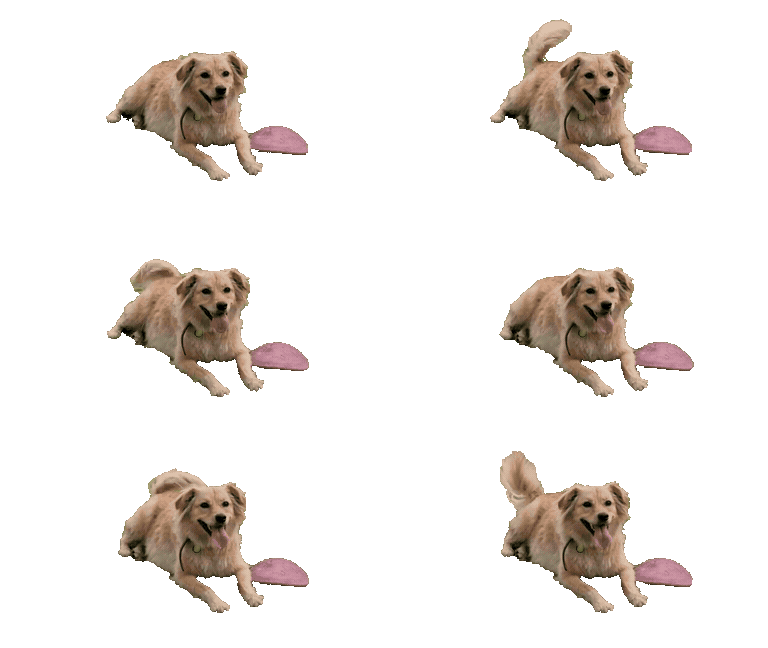
How to remove the background from an animated GIF
Three steps, no software to install — the whole job runs in this browser tab.
Upload your GIF
Drag the animated GIF onto the tool above, or click to browse. Your browser decodes it into frames locally first — nothing leaves your device until the cutout actually starts.
AI cuts out every frame
Each frame goes through the same subject-detection engine that powers our photo background remover. A progress counter shows the frames coming back; if the engine can't read one frame, that frame keeps its original pixels, so the animation never skips.
Download GIF or WebP
When the last frame lands, the tool re-encodes everything in your browser. Pick the transparent GIF for maximum compatibility, or the animated WebP for smoother edges and a smaller file.
Transparent GIF vs animated WebP: which to download
Both downloads contain the same frame-by-frame cutout. The difference is how each format stores transparency — and where the file will play.
Transparent GIF
GIF stores transparency as a single on/off bit per pixel: a pixel is either fully opaque or fully gone. That is why cutout edges in a transparent GIF can show a faint fringe or a stair-stepped outline — there is no half-transparent pixel to soften the transition. The upside is reach: Discord, Slack, forums, and virtually any app that accepts images will play a GIF without thinking about it.
Animated WebP
WebP carries a full 8-bit alpha channel, so edges keep their soft, anti-aliased look — hair, fur, and motion blur survive the cutout intact. Files are usually smaller than the equivalent GIF, too. The catch: some older apps and editors still refuse animated WebP. If the destination is a modern website or design tool, WebP is the better file.
Rule of thumb: for websites and design tools, take the WebP; for Discord, Slack, forums, and sticker packs, take the GIF.
Need this from your own code? The background removal API runs the same cutout.
Make a GIF transparent for Discord, Slack, websites and stickers
A transparent background is what turns a screen recording or a meme clip into a reusable asset. Four places these cutouts end up:
Discord emojis and stickers
A custom animated emoji only looks right when the background is gone — a white box around a dancing character reads as a screenshot. Upload the transparent GIF as a server emoji or sticker and it sits cleanly on any chat color.
Slack custom emoji
Slack animates custom emoji in messages and reactions. A transparent GIF of your mascot, your logo, or an inside joke lands in the emoji picker with no cropping and no colored square behind it.
Website and app animations
Product demos, loading indicators, and hero animations that float over your page background instead of blocking it out. Take the WebP for these — full alpha means clean edges over any color, and the file is smaller.
Messaging stickers
Sticker packs for messaging apps expect transparent backgrounds by design. Cut the background here, then import the frames into your pack builder — no manual masking, frame by frame.
Once the background is gone, you can add a realistic shadow to ground the subject of a still frame.
Limits: frame count, file size, and length
GIF processing is capped per frame, because every frame is a full AI cutout. The current ceilings:
- Frame limit: 30 frames on the free tier, 100 frames on paid plans
- File size limit: 15 MB per GIF
- Animation length: no separate time cap — the frame limit is what counts (30 frames ≈ 2–3 seconds at typical GIF frame rates)
The tool checks your file before processing starts and tells you immediately when a limit applies — you never sit through a full run only to be rejected at the end.
Why AI beats color-key tools for GIFs
The traditional way to make a GIF transparent is color keying: pick the background color, delete it, repeat for every frame. That works in a studio — and fails almost everywhere else.
Any background, not just green screens
Color-key tools assume the background is one flat color. Real GIFs — memes, screen recordings, phone clips — have gradients, clutter, and shadows behind the subject. The AI detects the subject itself, so the background can be anything.
Edges that survive motion
Keying by color leaves a halo wherever the subject's edge blends into the background — and hair, fur, and motion blur are exactly the pixels a color threshold gets wrong. The per-frame AI cutout follows the subject's real outline, frame after frame.
No per-frame threshold tuning
With a color keyer you tune the threshold for one frame, then watch it break as the lighting shifts across the animation. Here every frame is analyzed independently — the fifteenth frame gets the same treatment as the first, with nothing to adjust.
Processing a folder of still images instead of an animation? Try the bulk background remover.
GIF background remover FAQ
Free allowance, formats, and how this compares to the tools you searched for.
Remove your first background now
Remove a background with AI in seconds — upload a photo and get a transparent PNG. Free, no signup, no watermark.