Best Free Background Remover? What You Download
Same four photos through six free background removers. Measured export pixels, watermarks and account walls — a test record, not a ranked list.
 BackGone Team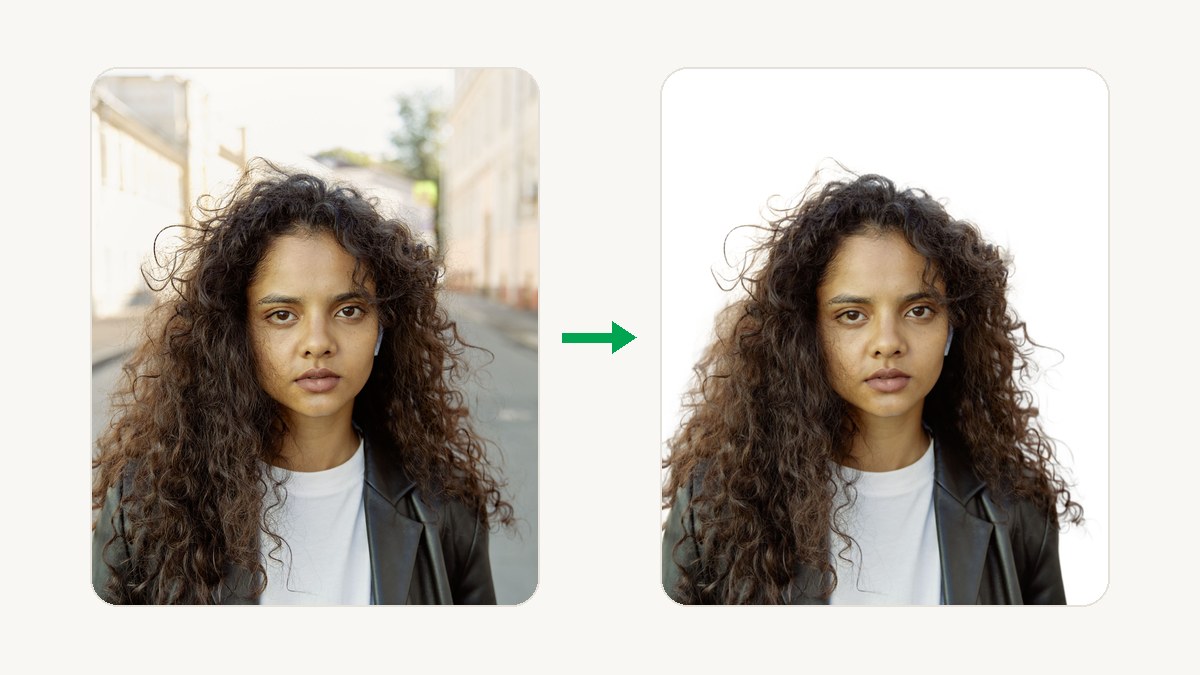
On 30 September 2026 we ran four photos through the free tiers of the background removers people actually search for. remove.bg's official limit is a 0.25-megapixel preview. Canva's free plan does not include background removal at all. BackGone returned a 1024px transparent PNG with no watermark and no account. This page records export size, watermark, account walls and caps — it is not a ranked "best of" list.
Last measured: 2026-09-30. Free tiers change often. If a number below is wrong when you try it, the vendor changed the plan — check the file properties on your own download.
Results at a glance
"Measured" means we downloaded the file and read its pixel dimensions. "Official page" means the vendor states it on their own site today. "Not published" means the vendor does not say — and we do not guess.
BackGone
- Free export
- 683–1024px longest side (0.7MP), transparent PNG
- Watermark
- None
- Account needed
- No
- Free cap
- 2 images/day anonymous, 5/day with a free account
- Source
- Measured
remove.bg
- Free export
- Up to 0.25MP preview, personal use only
- Watermark
- Not stated
- Account needed
- Not stated
- Free cap
- 50 free previews/month (desktop app & API)
- Source
- Official page
Canva
- Free export
- Not available on the free plan
- Watermark
- —
- Account needed
- —
- Free cap
- Pro feature
- Source
- Official page
Pixelcut
- Free export
- "Limited" removal; export size not published
- Watermark
- None ("free export without watermark")
- Account needed
- Not stated
- Free cap
- "Limited" — count not published
- Source
- Official page
Adobe Express (now Firefly)
- Free export
- Transparent PNG; resolution not stated
- Watermark
- Not stated
- Account needed
- Yes — Adobe account
- Free cap
- "Free daily generations" — count not stated
- Source
- Official page
Clipdrop
- Free export
- Standard resolution (high-res is Pro); exact px not stated
- Watermark
- Not stated
- Account needed
- Not stated
- Free cap
- 20 removals per 24h
- Source
- Official page
Photoroom
- Free export
- Not published
- Watermark
- Not published
- Account needed
- Not published
- Free cap
- Not published
- Source
- Not measured
How to read this table: pixels you keep matter more than a star rating. A clean edge on a 0.25MP preview is not a usable cutout for a marketplace listing — it is a sample of the paid product.
How we tested
- Four photos, all from Pexels at full resolution: a portrait with flyaway hair (2333×3500), a product shot (3438×2304), a long-haired dog (4000×2667), stacked wine glasses (3840×5760).
- Free path only: no payment, no credits spent, anonymous where the tool allows it.
- Download the file the tool actually lets you save — not a screenshot of the on-screen preview.
- Read pixel dimensions from the saved file's properties.
- Record watermark, account wall, and the stated cap. Where a vendor's own page states the limit, we quote the page instead of guessing.
We ran BackGone's own pipeline on all four photos on 2026-09-30 — same code as production, real engine output. For other tools we use their official pages, dated. Two of our four test photos exceeded BackGone's free input limit and had to be resized first — details below, because that is part of what "free" means here.
What "free" hid in 2026
remove.bg is still the edge-quality reference, and its free tier is officially a preview: "remove.bg is 100% free for low-resolution images (up to 0.25 megapixels) processed on the website and for personal use." On a 2333×3500 portrait that is about 3% of the pixels. Anything above 0.25MP — up to 50MP — is paid. The standalone website and self-serve API shut down on 1 December 2026; manual removal moves into Canva and the API moves to Leonardo.Ai. If you rely on it, read our shutdown timeline and migration guide.
Canva bundles a good remover — in Pro. Its pricing page lists background removal for images and videos as "Unavailable" on the free plan. This is not a limit; the feature simply is not there.
Pixelcut is the honest middle: its free plan advertises "free export without watermark" with "Limited" background removal. How limited, and at what resolution, the pricing page does not say — so neither do we.
Adobe Express now routes its background remover to Adobe Firefly. The official answer: free with an Adobe account, using "free daily generations" (the daily count is not stated), output as a transparent PNG. Resolution and watermark are not stated on the page.
Clipdrop is the only tool here that publishes an exact free allowance: 20 background removals per 24 hours. High-resolution removal is a Pro feature (1,000 per 24h).
Photoroom lets you "start for free," but its pricing page publishes no free-tier specifics, and its help center was unreachable on test day. Rather than repeat what other listicles claim, its cells stay at Not measured.
Where BackGone sits
BackGone is a hosted remover with a small free allowance and no watermark. Measured on 2026-09-30 with the four photos above:
- No account: 2 images per day. Free account: 5 per day.
- Free output: transparent PNG capped at 1024px on the longest side (0.7MP for these photos, 0.9–1.7MB files). Paid plans return full resolution.
- Free input limit: 9 megapixels. Our 10.7MP dog photo and 22.1MP glassware photo were rejected with a clear resize-or-upgrade message — we resized them to 3000px and re-ran. If your camera originals are huge, you resize first on the free tier.
- Uploads: PNG, JPEG, WebP, up to 10MB, processed in memory and discarded after delivery.
- Paid credits never expire; the API starts at $0.020 per image on the largest pack.
That is not "unlimited." It is a usable free slice of the same file you would keep on a paid plan — and we publish the caps on our pricing page so you can check this paragraph against them.
The three hard cases from our own test run, free-tier output shown at 200%:
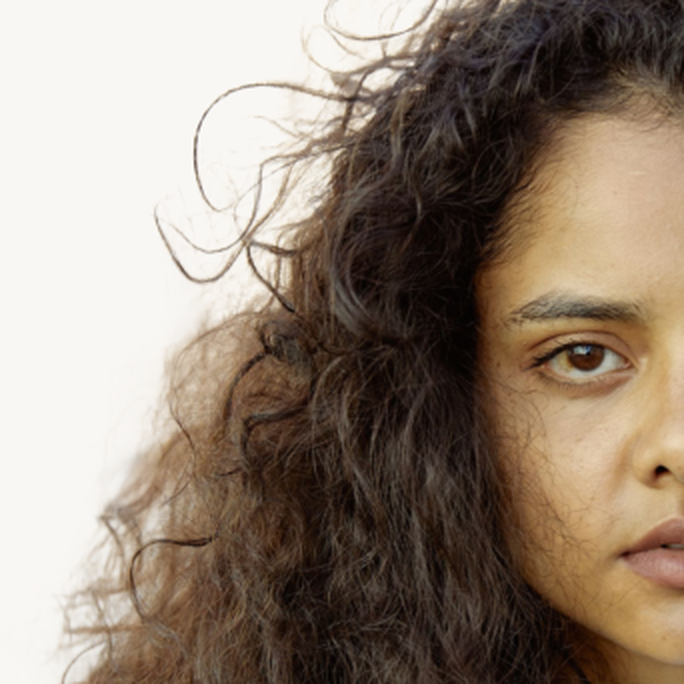
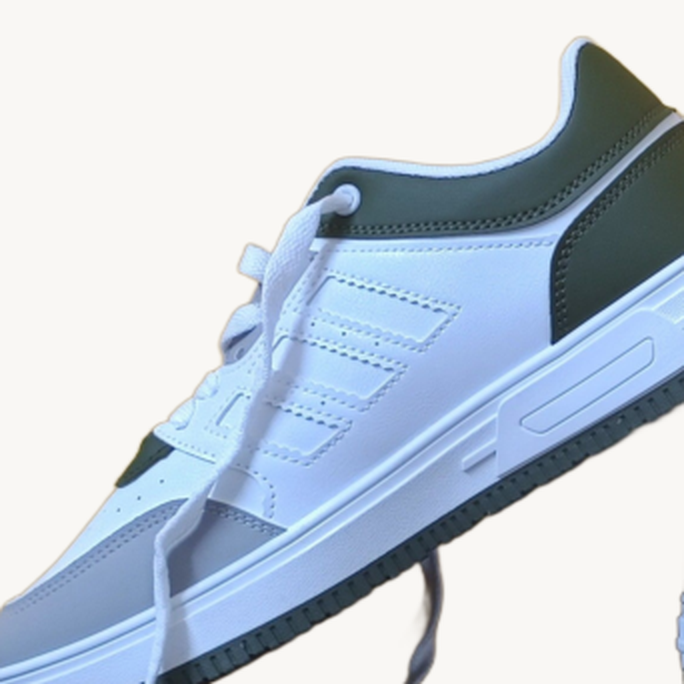

Flyaway hair, product edge, glass rim — BackGone free-tier output (1024px longest side), 2026-09-30.
Which free tool to use
A quick cutout right now, no account, no watermark
- Use
- BackGone
- Why
- 2 images/day anonymous, transparent PNG, nothing to install or sign.
The best possible hair edges and you can pay (or accept a preview)
- Use
- remove.bg — before 2026-12-01
- Why
- Quality reference, but the free file is 0.25MP and the service shuts down 1 December.
You already live in Adobe tools
- Use
- Adobe Firefly
- Why
- Free with your Adobe account, transparent PNG, daily generation allowance.
Watermark-free exports with more headroom than a daily pair
- Use
- Pixelcut
- Why
- Officially watermark-free exports; the exact free cap is unpublished.
A bigger free daily batch and standard resolution is fine
- Use
- Clipdrop
- Why
- 20 removals per 24h, published on its pricing page.
Bulk product photos, marketplace sizes, or an API
- Why
- This is what paid tiers are for — free plans everywhere are shaped to prevent it.
Limits we will not hide
- BackGone free use stops at 2 or 5 images per day, output capped at 1024px, input capped at 9MP on the free tier and 10MB per file.
- We process on a server in memory. If your rule is "the pixels never leave this laptop," use a local in-browser tool instead — that is a different category from any hosted remover, ours included.
- Wet glass, motion blur, and hair against a same-colored background still defeat every tool in this table. Expect a manual cleanup pass on genuinely hard photos anywhere.
FAQ
What is the best free AI background remover in 2026?
There is no single winner — it depends on which constraint you accept. For a no-account, no-watermark PNG with a clear daily cap, BackGone gives 2 images a day (5 with a free account). For published volume, Clipdrop gives 20 per day at standard resolution. For edge quality on hair, remove.bg still leads — but its free download is a 0.25MP preview and the service ends 1 December 2026.
Can I get a full-resolution PNG with no watermark for free?
Rarely. Either the resolution is capped (BackGone free: 1024px; remove.bg free: 0.25MP), or the resolution is unpublished (Pixelcut, Adobe Firefly). Do not trust the marketing line — download the file and read its dimensions.
Is remove.bg still free?
Partially, until it closes. The website runs the model free and gives a low-resolution (0.25MP) download; the desktop app and API include 50 free previews per month. The standalone product shuts down on 1 December 2026.
Do I need an account to remove a background for free?
Not everywhere. BackGone and Clipdrop work without one (2/day and 20/day respectively); Adobe Firefly requires an Adobe account; Canva's free plan does not include the feature at all.
Why do free tools limit the download size?
Because the free download is the top of a paid funnel. A 0.25MP preview proves the edge quality without giving you a usable master file; a daily cap gives you a usable file without giving you volume. Knowing which lever a tool pulls tells you what its free tier is actually for.
Measured and checked against official pages on 2026-09-30. remove.bg's shutdown may change parts of this page within weeks — we re-run the same four photos quarterly and update the table and the date above. Related: remove.bg alternative · API migration guide · how to remove a background without wrecking the edges.